

Project overview
Online meetings with foreign partners usually end in a compromise: broken English or an interpreter on the line. Talkbridge handles it inside the browser. You hear translated voice and captions in your language, and the others hear you in theirs, because the translation goes out as your microphone. The people you talk to install nothing. The product is now publicly available on the Chrome Web Store.
The challenge
Live voice translation has to be fast and stable enough to keep the conversation natural, and it has to work inside an existing tool that we cannot change.
Latency
Translation has to follow the speaker with a delay of a few seconds. Anything longer breaks the rhythm of a conversation.
Two directions at once
Besides translating the others, your own voice has to be translated too, and the other side must hear it like an ordinary microphone, with nothing installed on their end.
Echo on speakers
Without headphones the translated voice leaks back into the microphone and loops the call. Echo protection is needed that does not cut off your own speech.
Privacy and cost
Calls are sensitive and AI engine costs have to be billed fairly. Audio goes straight to the provider of your choice on the user's own key, and nothing passes through our servers.
Our solution
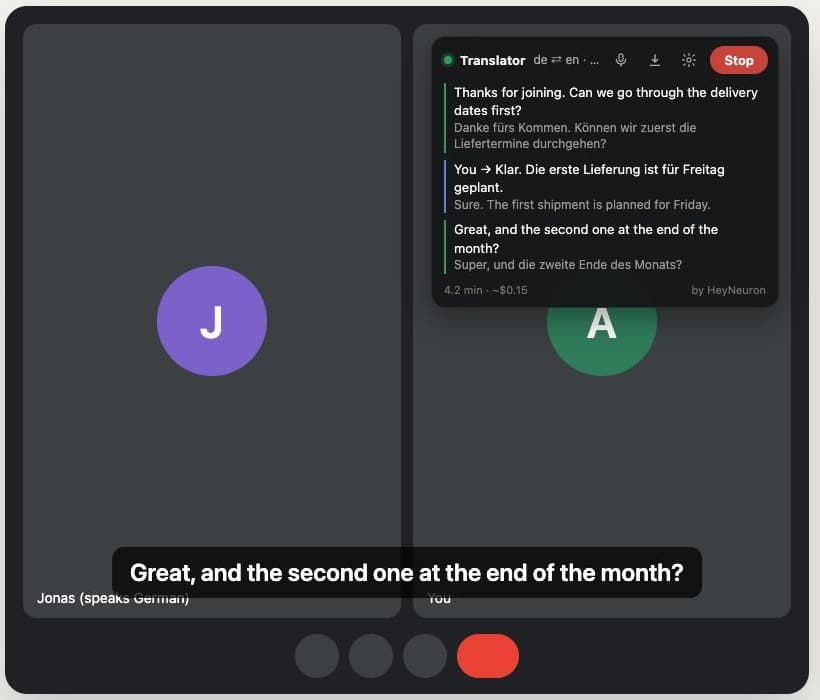
The extension plugs into an existing Google Meet call and runs two independent translations in parallel, while the user sees everything in a single panel.
Capturing audio in Meet
The extension hooks into the microphone and the voices of the other participants, so it can process them and replace them with what the other side should hear.
Two translation directions
One track translates the others into your language, the other translates your voice into theirs. You pick languages in two clicks, with 30+ languages available.
Captions and transcript panel
Live captions, large captions over the video, a glossary for names and jargon, a minute and cost counter, and a call transcript you can download as Markdown.
Engine choice and access model
The user picks OpenAI or Google Gemini and brings their own key. 60 minutes are free, then a license key is enough, free or pay what you want.
Describe what you want to improve
Tell us what you need - an app, website or store, an integration or an AI agent. You get a concrete quote for what you want: what we will do, how much it costs and when we can start.
Technologies
Project gallery
Planning a similar project?
Book a free consultation to discuss your project.
Book a free consultation